projects
Company
FLUXO
FLUXO is a SaaS platform designed to streamline healthcare inventory management across clinical and administrative teams. Built to improve visibility and efficiency in medical supply workflows, FLUXO supports healthcare facilities in reducing errors, automating processes, and enabling better operational decision-making.
Field
SaaS
supply management
healthcare
Duration
10 – 12.2025
Tools
Figma
Miro
Roles
user journey
prototyping
ui design
product design
systems thinking
Company
FLUXO
FLUXO is a SaaS platform designed to streamline healthcare inventory management across clinical and administrative teams. Built to improve visibility and efficiency in medical supply workflows, FLUXO supports healthcare facilities in reducing errors, automating processes, and enabling better operational decision-making.
Field
SaaS
supply management
healthcare
Duration
10 – 12.2025
Tools
Figma
Miro
Roles
user journey
prototyping
ui design
product design
systems thinking
Why this project?
Following an icy accident in the beggining of 2025 that forced me to undergo 3 surgeries and several weeks in the hospital, I realized how the health care teams struggle managing medical supplies, ultimately causing delays on surgeries and other treatments - this was the problem which inspired this project.
What was the challenge?
Healthcare facilities lacked an unified system to manage medical supplies, leaving nurses, managers, directors, and finance teams frustrated. Nurses spent time manually tracking stock, Managers struggled with delayed requests and unclear deliveries, Directors couldn't get a clear overview of usage, and finance teams relied on spreadsheets that were slow and error-prone. With multiple roles and fragmented processes, this facilities needed a smart, role-specific solution that could make inventory management efficient, transparent, and easy for everyone.
Why this project?
Following an icy accident in the beggining of 2025 that forced me to undergo 3 surgeries and several weeks in the hospital, I realized how the health care teams struggle managing medical supplies, ultimately causing delays on surgeries and other treatments - this was the problem which inspired this project.
What was the challenge?
Healthcare facilities lacked an unified system to manage medical supplies, leaving nurses, managers, directors, and finance teams frustrated. Nurses spent time manually tracking stock, Managers struggled with delayed requests and unclear deliveries, Directors couldn't get a clear overview of usage, and finance teams relied on spreadsheets that were slow and error-prone. With multiple roles and fragmented processes, this facilities needed a smart, role-specific solution that could make inventory management efficient, transparent, and easy for everyone.
Why this project?
Following an icy accident in the beggining of 2025 that forced me to undergo 3 surgeries and several weeks in the hospital, I realized how the health care teams struggle managing medical supplies, ultimately causing delays on surgeries and other treatments - this was the problem which inspired this project.
What was the challenge?
Healthcare facilities lacked an unified system to manage medical supplies, leaving nurses, managers, directors, and finance teams frustrated. Nurses spent time manually tracking stock, Managers struggled with delayed requests and unclear deliveries, Directors couldn't get a clear overview of usage, and finance teams relied on spreadsheets that were slow and error-prone. With multiple roles and fragmented processes, this facilities needed a smart, role-specific solution that could make inventory management efficient, transparent, and easy for everyone.
Research & Define
Mapping needs to design solutions
To tackle the fragmented inventory workflows, I started by understanding each role’s needs and pain points. Mapping user journeys and identifying recurring inefficiencies laid the foundation for a clear, scalable system. These insights guided the design of a coherent interface and prioritized the features that would have the most impact.
Research & Define
Mapping needs to design solutions
To tackle the fragmented inventory workflows, I started by understanding each role’s needs and pain points. Mapping user journeys and identifying recurring inefficiencies laid the foundation for a clear, scalable system. These insights guided the design of a coherent interface and prioritized the features that would have the most impact.
Research & Define
Mapping needs to design solutions
To tackle the fragmented inventory workflows, I started by understanding each role’s needs and pain points. Mapping user journeys and identifying recurring inefficiencies laid the foundation for a clear, scalable system. These insights guided the design of a coherent interface and prioritized the features that would have the most impact.
Personas





#clinical assistants
#clinic managers
#nurses
#finance staff
#operations leads
#directors
#clinical assistants
#finance staff
#clinic managers
#operations leads
#nurses
#directors
User Journeys
To understand how different roles interact with the current inventory process, I mapped out user journeys for nurses, clinical assistants, managers, directors, and finance staff. These journeys revealed a system that is largely time-consuming and inefficient: nurses and medical assistants rely on email requests and manual stock tracking, managers face long approval waiting times, directors lack an overview of usage trends, and finance staff contend with error-prone spreadsheets. Across all roles, there are too many unnecessary steps, leading to delays, frustration, and higher risk of mistakes.
Mapping these journeys helped identify the key pain points and opportunities that the software could address.
Medical Assistant
Office Manager
Nurse
Doctor/Owner
Procurement Specialist
Claudia Weber
1
Notice low supplies
check cabinets
note what’s missing
fill paper form
😔
Frustrated
💡
Real-time inventory tracking
2
Report issue
call supplier
email manager
😨
Overwhelmed
💡
Mobile/digital ordering system
3
Wait for approval
follow up via email or phone
😧
Anxious
💡
Automated reminders and status overview
4
Receive confirmation
check emails
confirm order received
😌
Relieved
💡
Instant approval notifications
5
Track delivery
Manually check with supplier or delivery person
🤔
Uncertain
💡
Dashboard showing order status
Medical Assistant
Office Manager
Nurse
Doctor/Owner
Procurement Specialist
1
Notice low supplies
check cabinets
note what’s missing
fill paper form
😔
Frustrated
💡
Real-time inventory tracking
2
Report issue
call supplier
email manager
😨
Overwhelmed
💡
Mobile/digital ordering system
3
Wait for approval
follow up via email or phone
😧
Anxious
💡
Automated reminders and status overview
4
Receive confirmation
check emails
confirm order received
😌
Relieved
💡
Instant approval notifications
5
Track delivery
Manually check with supplier or delivery person
🤔
Uncertain
💡
Dashboard showing order status
Medical Assistant
Office Manager
Nurse
Doctor/Owner
Procurement Specialist
1
Notice low supplies
check cabinets
note what’s missing
fill paper form
😔
Frustrated
💡
Real-time inventory tracking
2
Report issue
call supplier
email manager
😨
Overwhelmed
💡
Mobile/digital ordering system
3
Wait for approval
follow up via email or phone
😧
Anxious
💡
Automated reminders and status overview
4
Receive confirmation
check emails
confirm order received
😌
Relieved
💡
Instant approval notifications
5
Track delivery
Manually check with supplier or delivery person
🤔
Uncertain
💡
Dashboard showing order status
Key Insights & Opportunities
Analyzing the user journeys revealed recurring issues across all roles: inventory management is fragmented, communication relies heavily on emails, and approval processes are slow and unclear. Stock visibility is limited, creating uncertainty for both clinical and administrative staff. These inefficiencies lead to duplicated effort, preventable errors, and wasted time.
The opportunity lies in creating a centralized, role-specific system that simplifies requests, automates approvals, and provides everyone—from nurses to finance teams—with real-time insight into supply levels and usage.
Value Proposition
A smart, role-specific inventory system that gives healthcare professionals clarity, efficiency, and control. By connecting all departments through one streamlined platform, the app minimizes manual work, reduces errors, and supports better decision-making across the organization.
Hypothesis Statement
I believe that designing a role-specific, cross-device system for healthcare inventory management will simplify daily workflows, reduce manual errors, and improve visibility across all operational levels.
Design Goals
Provide real-time visibility and data-driven insights
Tailor the interface and permissions to each user role
Support mobility for on-site staff and dashboards for management
Streamline repetitive inventory and approval tasks
Foster collaboration and accountability across departments
Key Insights & Opportunities
Analyzing the user journeys revealed recurring issues across all roles: inventory management is fragmented, communication relies heavily on emails, and approval processes are slow and unclear. Stock visibility is limited, creating uncertainty for both clinical and administrative staff. These inefficiencies lead to duplicated effort, preventable errors, and wasted time.
The opportunity lies in creating a centralized, role-specific system that simplifies requests, automates approvals, and provides everyone—from nurses to finance teams—with real-time insight into supply levels and usage.
Hypothesis Statement
I believe that designing a role-specific, cross-device system for healthcare inventory management will simplify daily workflows, reduce manual errors, and improve visibility across all operational levels.
Value Proposition
A smart, role-specific inventory system that gives healthcare professionals clarity, efficiency, and control. By connecting all departments through one streamlined platform, the app minimizes manual work, reduces errors, and supports better decision-making across the organization.
Design Goals
Provide real-time visibility and data-driven insights
Tailor the interface and permissions to each user role
Support mobility for on-site staff and dashboards for management
Streamline repetitive inventory and approval tasks
Foster collaboration and accountability across departments
Key Insights & Opportunities
Analyzing the user journeys revealed recurring issues across all roles: inventory management is fragmented, communication relies heavily on emails, and approval processes are slow and unclear. Stock visibility is limited, creating uncertainty for both clinical and administrative staff. These inefficiencies lead to duplicated effort, preventable errors, and wasted time.
The opportunity lies in creating a centralized, role-specific system that simplifies requests, automates approvals, and provides everyone—from nurses to finance teams—with real-time insight into supply levels and usage.
Value Proposition
A smart, role-specific inventory system that gives healthcare professionals clarity, efficiency, and control. By connecting all departments through one streamlined platform, the app minimizes manual work, reduces errors, and supports better decision-making across the organization.
Hypothesis Statement
I believe that designing a role-specific, cross-device system for healthcare inventory management will simplify daily workflows, reduce manual errors, and improve visibility across all operational levels.
Design Goals
Provide real-time visibility and data-driven insights
Tailor the interface and permissions to each user role
Support mobility for on-site staff and dashboards for management
Streamline repetitive inventory and approval tasks
Foster collaboration and accountability across departments


A crossdevice, role-specific SaaS that streamlines healthcare inventory management.
The Solution
Cross-Device Access by Role
While all roles have access to the core features on mobile, detailed dashboards and complex management tools are currently optimized for larger devices.This approach prioritizes usability and clarity in the initial release. Future iterations may extend full functionality to mobile, guided by user testing and emerging needs for remote and on-the-go access.
Cross-Device Access by Role
While all roles have access to the core features on mobile, detailed dashboards and complex management tools are currently optimized for larger devices.This approach prioritizes usability and clarity in the initial release. Future iterations may extend full functionality to mobile, guided by user testing and emerging needs for remote and on-the-go access.
Operational Staff
Management &
Procurement
Executive & Finance
Scan, Request, Restock
Approve, Track Orders,
Stock Control
Overview, Reporting,
Budgeting
Limited
Limited
Optional
(scanning with webcam)
Core Feature
Smart Scan Flow
The “Smart Scan Flow” is the core feature that connects all operational actions — scanning items to use, restock, or request.
It replaces manual spreadsheets and email chains with a simple flow that reduces errors, saves time, and provides real-time inventory updates.
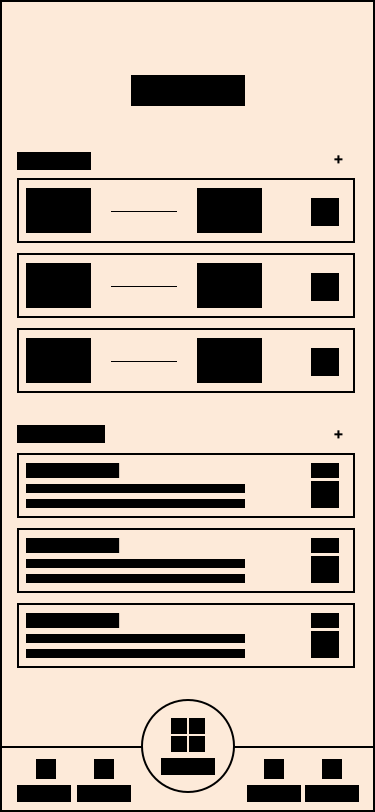
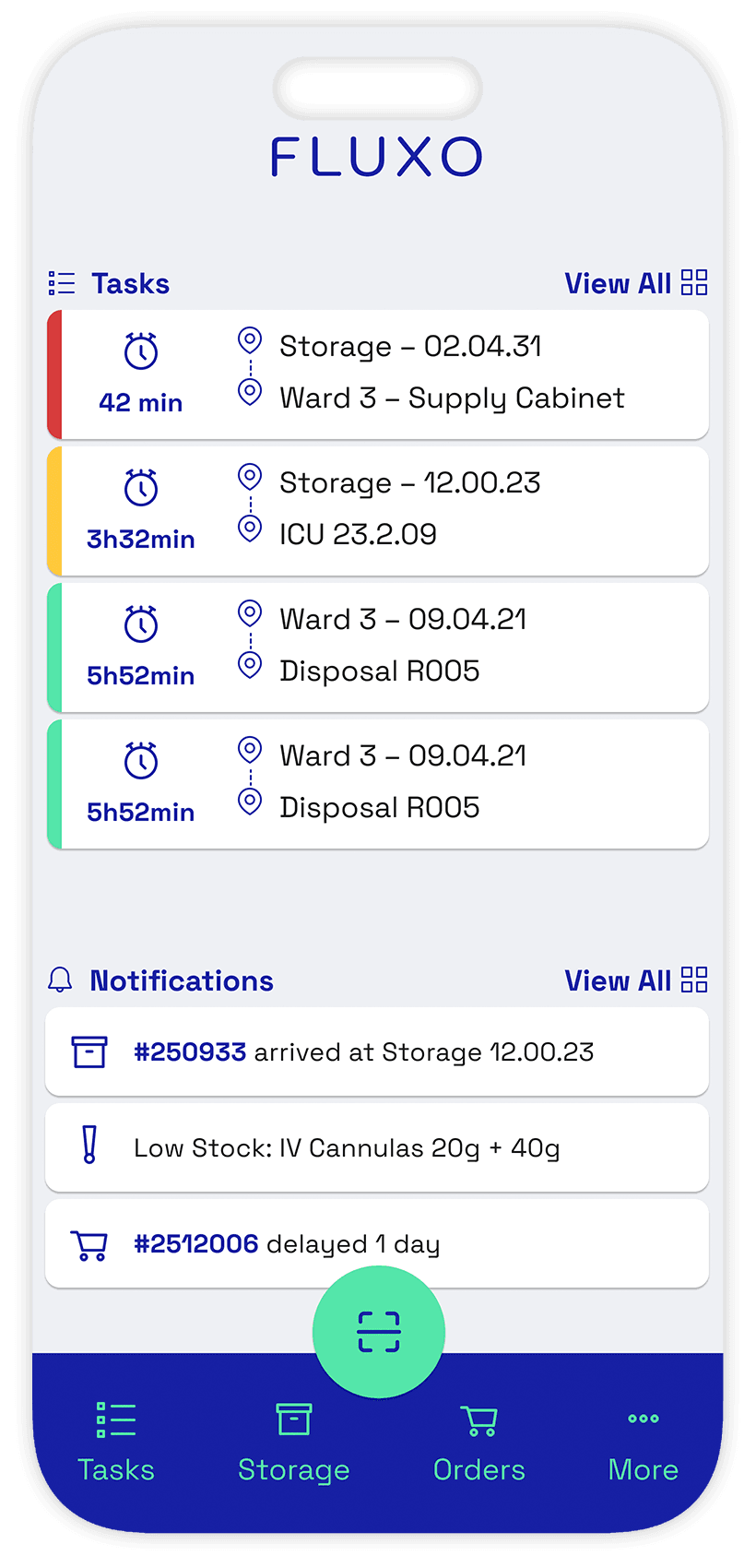
1. Home Screen
Users get a clear overview of all ongoing tasks, their priorities, and destinations. From here they enter a task to begin processing items.
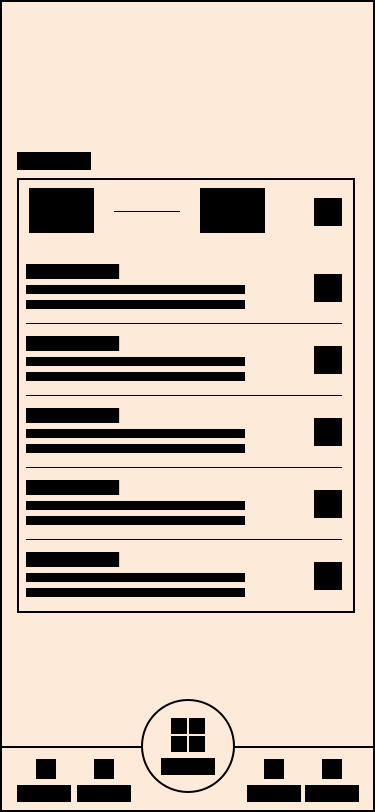
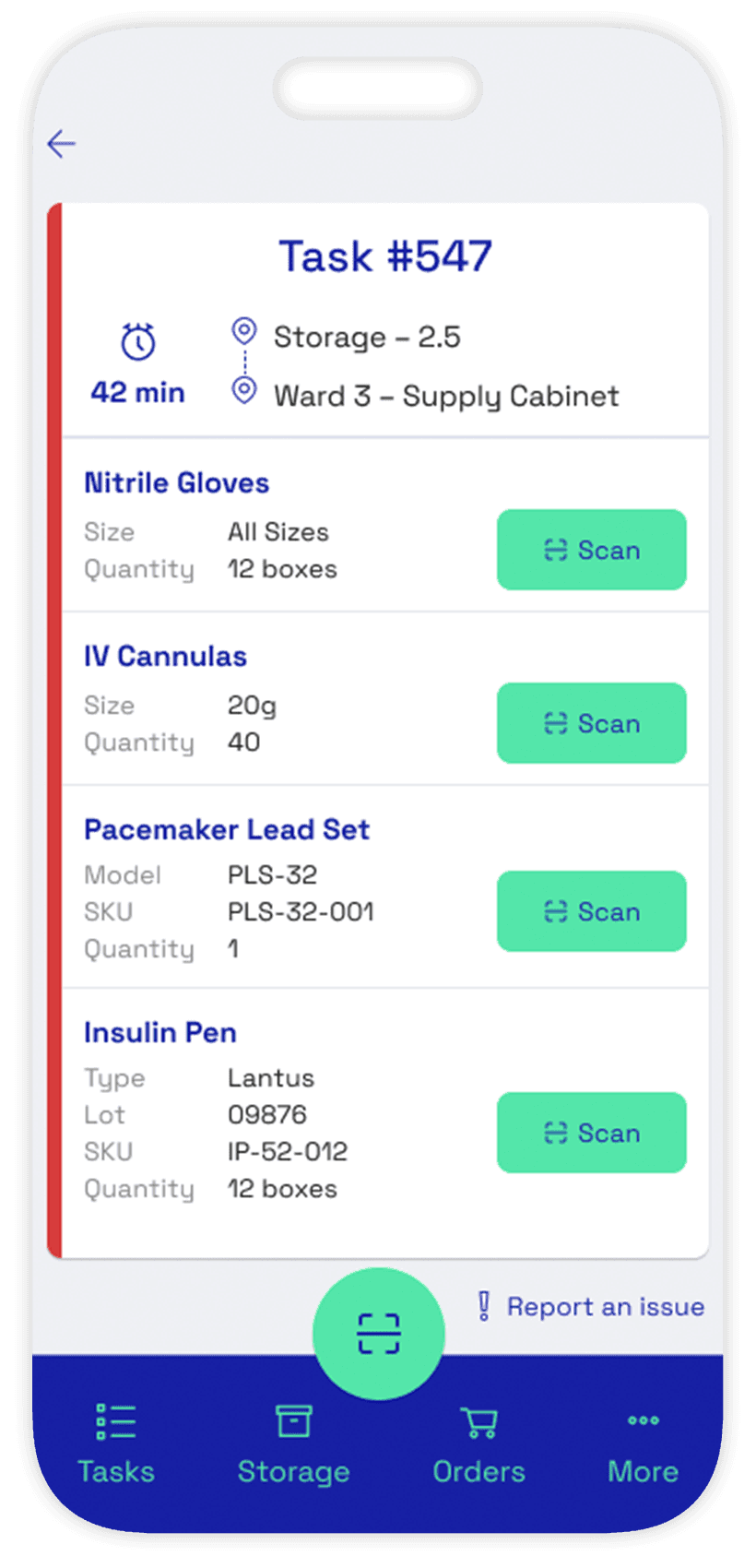
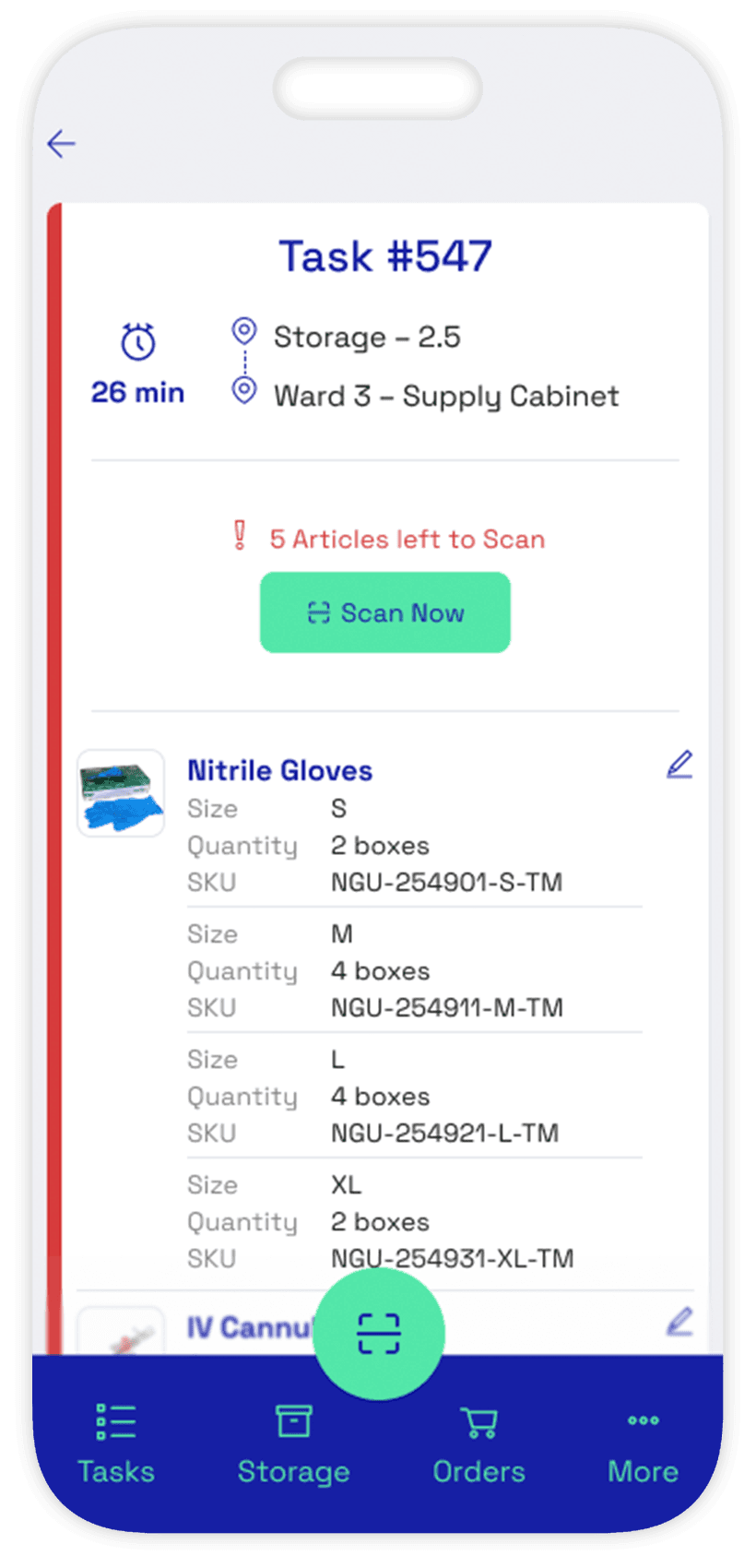
2. Task Details
The task shows all required items. Users can scan items individually or proceed through the list in any order.
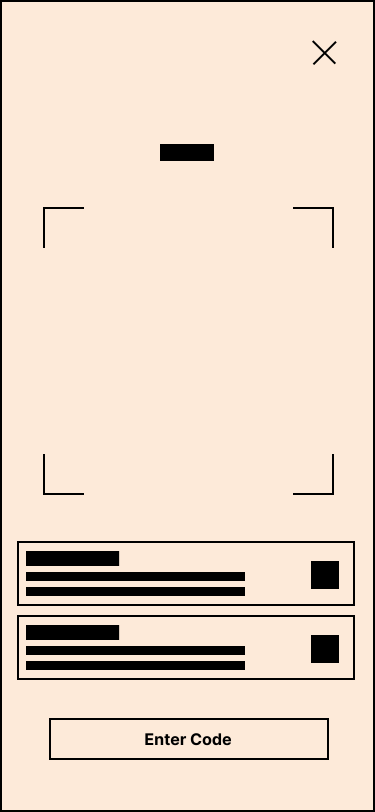
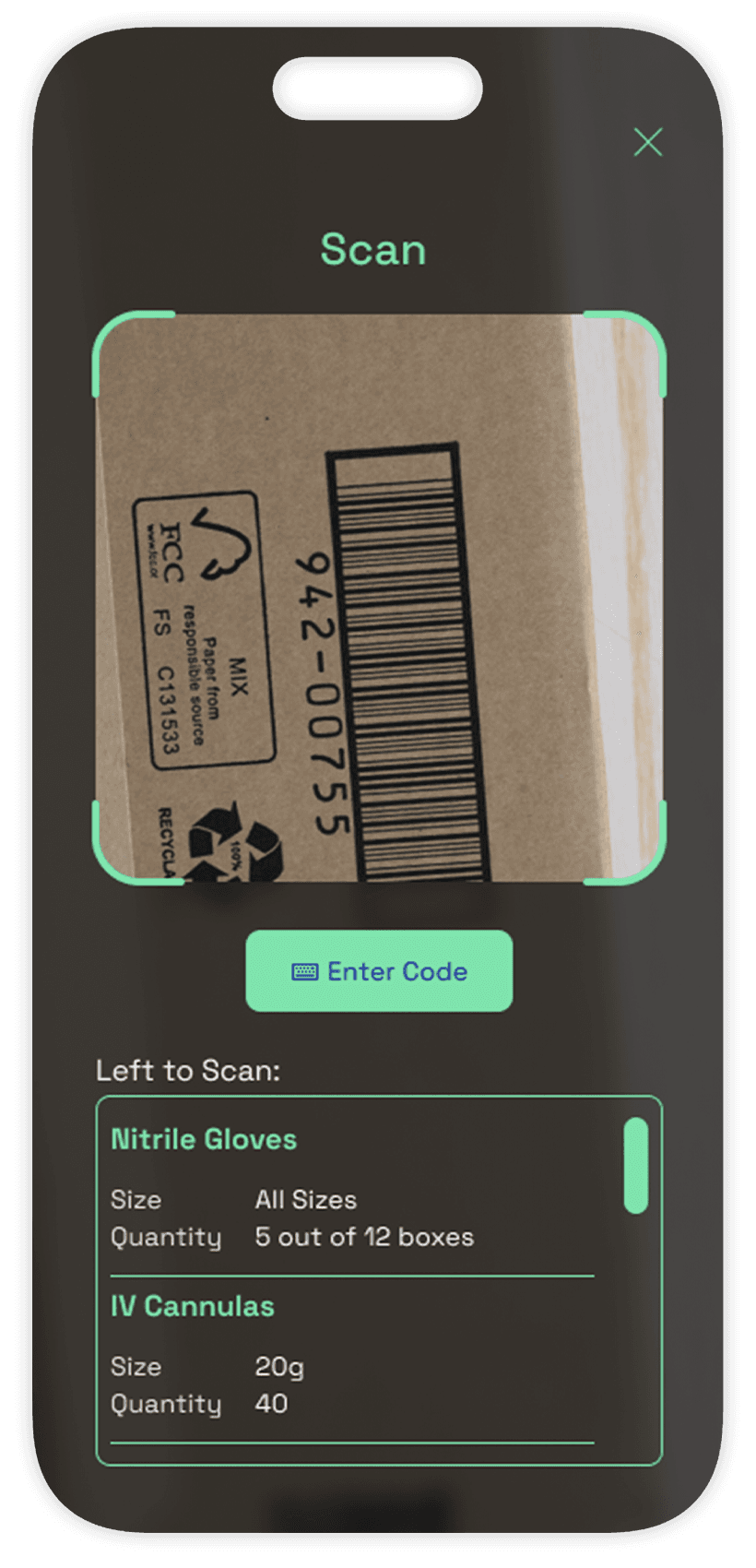
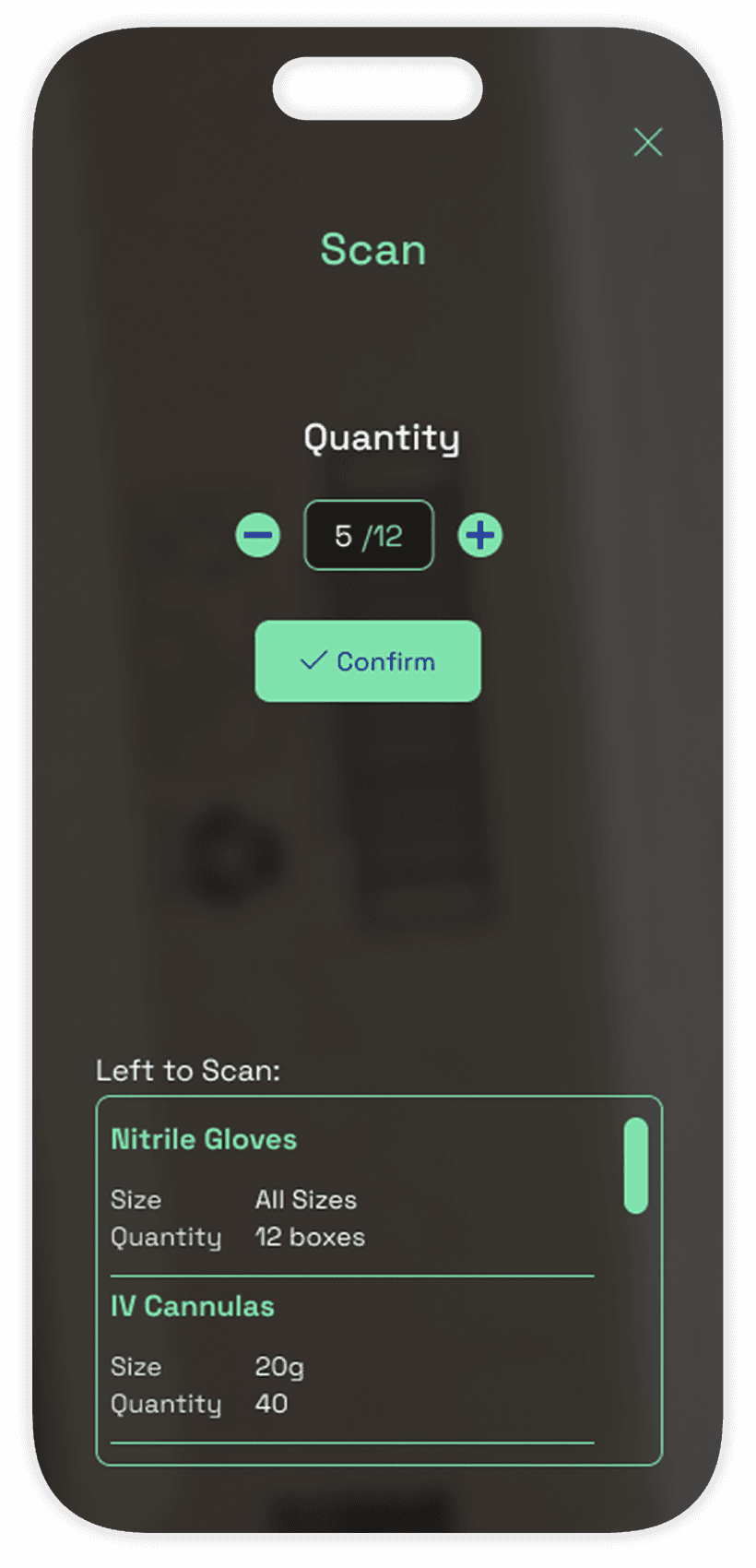
3. Scan
The scanning view lets users capture barcodes quickly. Remaining items stay visible so users always know what’s left.
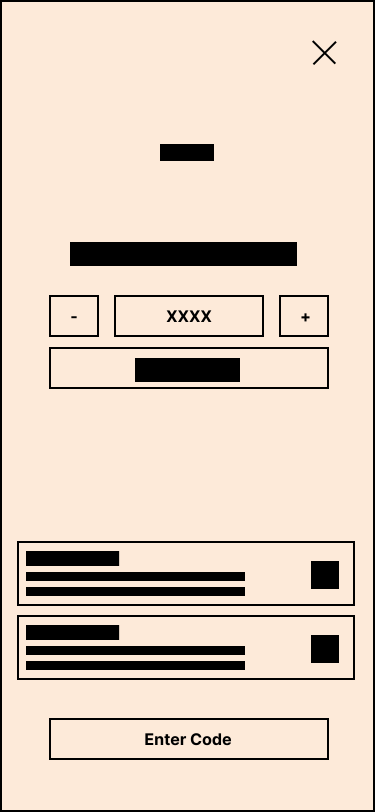
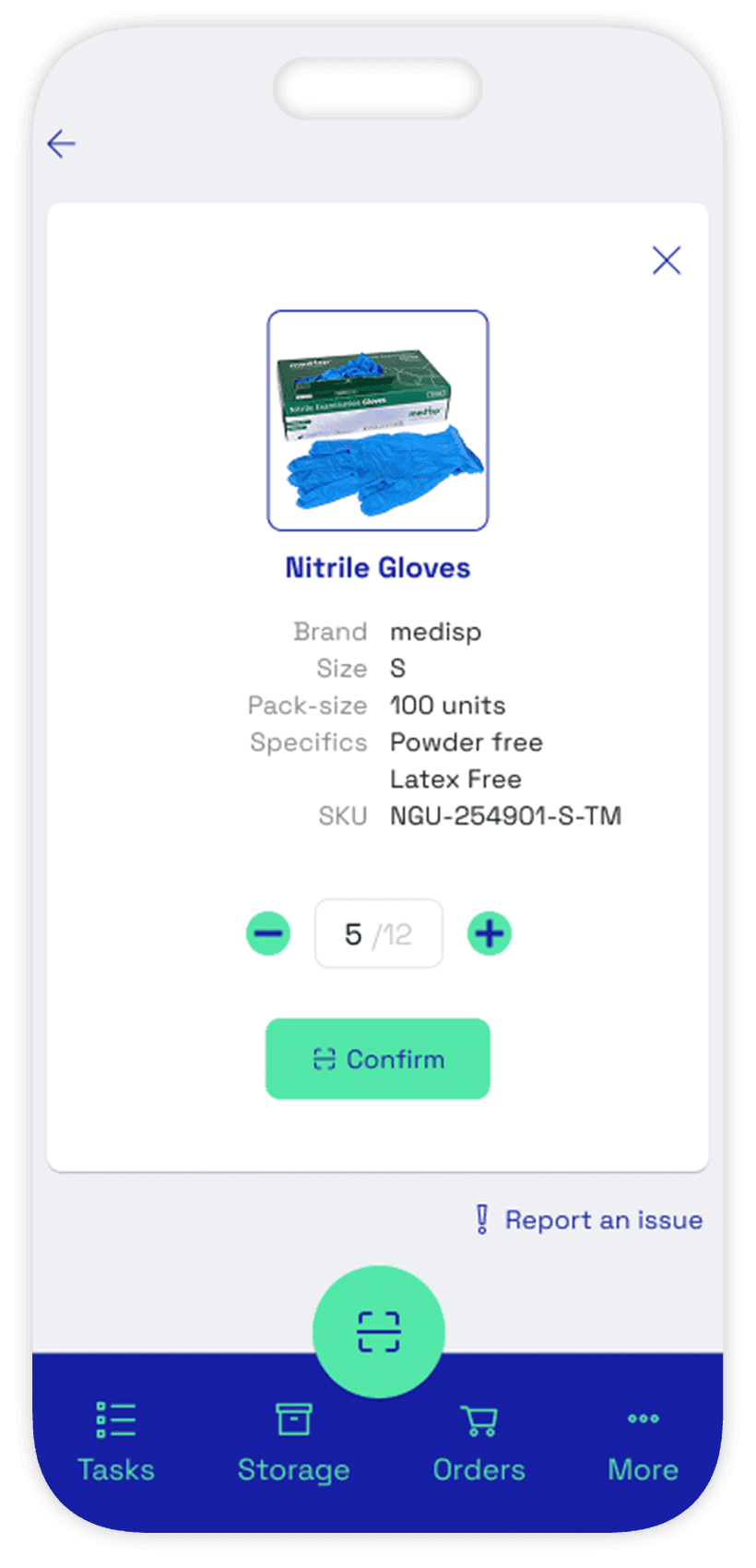
4. Adjust Quantity
After identifying an item, users can confirm or adjust the number of units taken—preventing repetitive scans and improving accuracy.
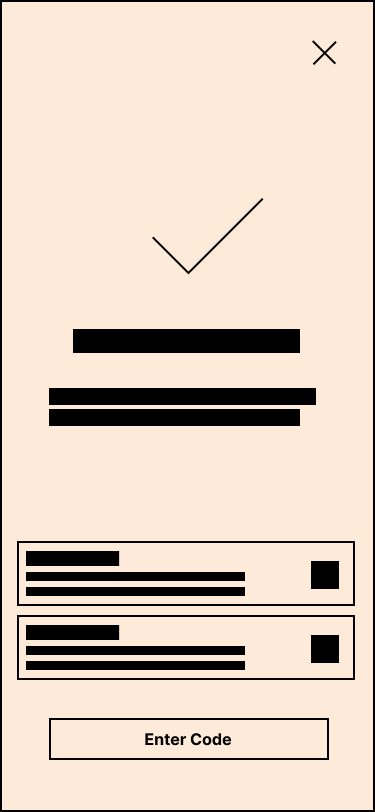
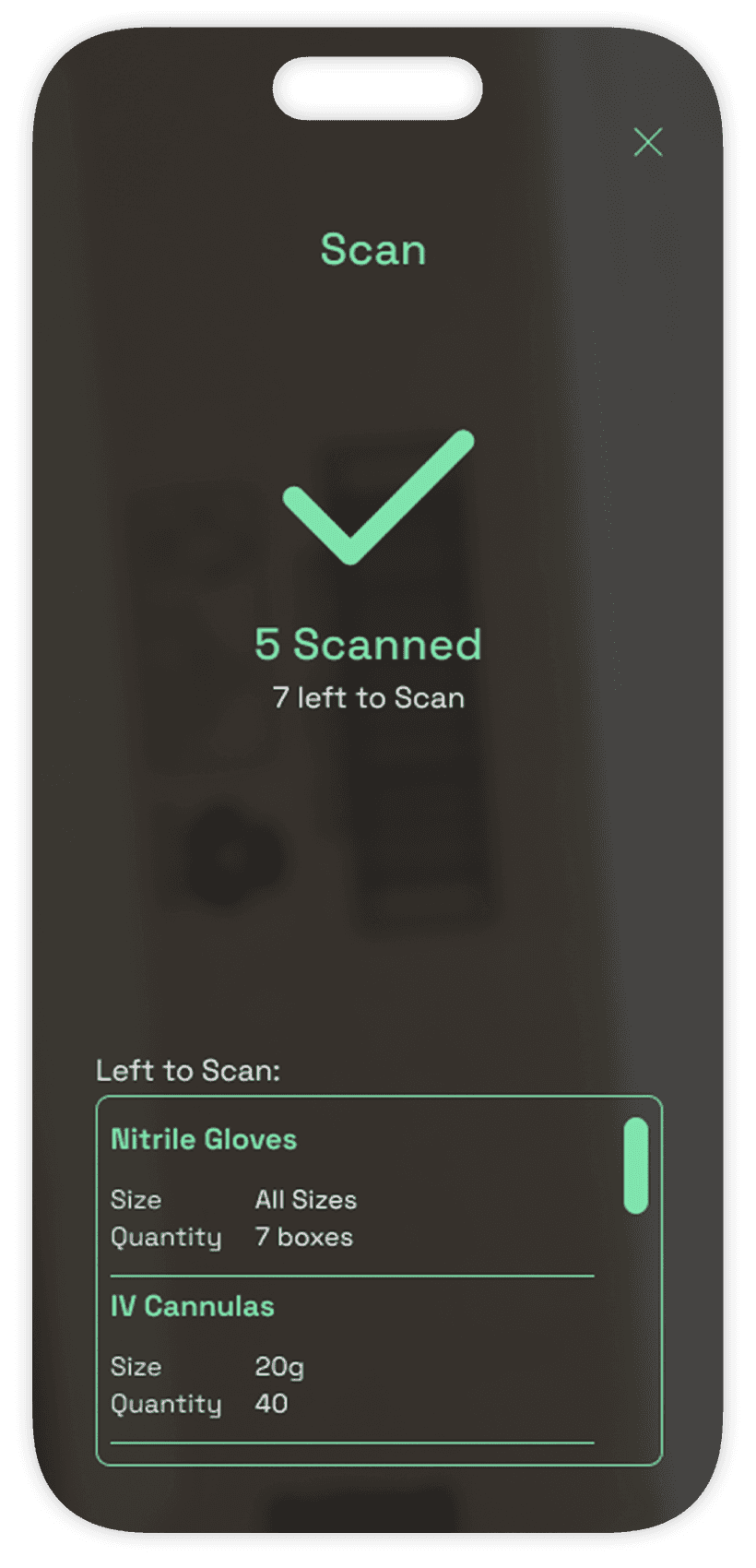
5. Confirmation Screen
A brief confirmation acknowledges the scan and updates the user’s progress - it automatically returns to scanning view to resume task.
1. Home Screen
Users get a clear overview of all ongoing tasks, their priorities, and destinations. From here they enter a task to begin processing items.
2. Task Details
The task shows all required items. Users can scan items individually or proceed through the list in any order.
3. Scan
The scanning view lets users capture barcodes quickly. Remaining items stay visible so users always know what’s left.
4. Adjust Quantity
After identifying an item, users can confirm or adjust the number of units taken—preventing repetitive scans and improving accuracy.
5. Confirmation Screen
A brief confirmation acknowledges the scan and updates the user’s progress - it automatically returns to scanning view to resume task.
1. Home Screen
Users get a clear overview of all ongoing tasks, their priorities, and destinations. From here they enter a task to begin processing items.
2. Task Details
The task shows all required items. Users can scan items individually or proceed through the list in any order.
3. Scan
The scanning view lets users capture barcodes quickly. Remaining items stay visible so users always know what’s left.
4. Adjust Quantity
After identifying an item, users can confirm or adjust the number of units taken—preventing repetitive scans and improving accuracy.
5. Confirmation Screen
A brief confirmation acknowledges the scan and updates the user’s progress - it automatically returns to scanning view to resume task.
High-Fidelity Screens
The hi-fidelity screens showcase a clean interface built on a scalable component system. Buttons, navigation, task cards, and quantity steppers are designed for consistency and efficiency, enabling fast, error-free workflows. Typography and color, supported by icons, are used to guide and inform the user.
Default Mode
The default mode provides a clear, structured overview of tasks and priorities, helping users quickly understand what needs attention before taking action. Navigation is fully accessible in this state. Clean layouts, clear hierarchy, and readable typography ensure users stay oriented and can transition smoothly into more focused actions, such as scanning.
Default Mode
The default mode provides a clear, structured overview of tasks and priorities, helping users quickly understand what needs attention before taking action. Navigation is fully accessible in this state. Clean layouts, clear hierarchy, and readable typography ensure users stay oriented and can transition smoothly into more focused actions, such as scanning.
Default Mode
The default mode provides a clear, structured overview of tasks and priorities, helping users quickly understand what needs attention before taking action. Navigation is fully accessible in this state. Clean layouts, clear hierarchy, and readable typography ensure users stay oriented and can transition smoothly into more focused actions, such as scanning.
Scanning Mode
The scanning mode shifts into a focused, distraction-free environment designed for fast, accurate item capture. Navigation is removed and replaced with a single exit option, while the camera feed takes over the background with a darkened overlay to maintain visual clarity. Users see only essential information—items left to scan, quantity adjustments, and confirmation steps—creating a streamlined, linear flow that supports efficiency during high-pressure, hands-on tasks.
Scanning Mode
The scanning mode shifts into a focused, distraction-free environment designed for fast, accurate item capture. Navigation is removed and replaced with a single exit option, while the camera feed takes over the background with a darkened overlay to maintain visual clarity. Users see only essential information—items left to scan, quantity adjustments, and confirmation steps—creating a streamlined, linear flow that supports efficiency during high-pressure, hands-on tasks.
Scanning Mode
The scanning mode shifts into a focused, distraction-free environment designed for fast, accurate item capture. Navigation is removed and replaced with a single exit option, while the camera feed takes over the background with a darkened overlay to maintain visual clarity. Users see only essential information—items left to scan, quantity adjustments, and confirmation steps—creating a streamlined, linear flow that supports efficiency during high-pressure, hands-on tasks.
Review
The review provides an overview of the scanned items, allowing users to quickly verify and identify any missing or incorrect entries. The interface balances clarity and control, displaying all captured items alongside key details such as quantities, models and sizes. Users can make quick adjustments—correcting mistakes, updating counts, or marking items as complete—without leaving the flow.
Review
The review provides an overview of the scanned items, allowing users to quickly verify and identify any missing or incorrect entries. The interface balances clarity and control, displaying all captured items alongside key details such as quantities, models and sizes. Users can make quick adjustments—correcting mistakes, updating counts, or marking items as complete—without leaving the flow.
Review
The review provides an overview of the scanned items, allowing users to quickly verify and identify any missing or incorrect entries. The interface balances clarity and control, displaying all captured items alongside key details such as quantities, models and sizes. Users can make quick adjustments—correcting mistakes, updating counts, or marking items as complete—without leaving the flow.
It's a Wrap!
Takeaways
Working through this project revealed several opportunities for future development — from workflow refinements to expanded role-specific features. Within the scope of the course, I chose to focus on the Home and the Smart Scan flow experiences, as these are the core interactions that enable a fast, reliable, real-time inventory system. Some of the broader design goals — such as advanced analytics, procurement tools, finance dashboards, and full role-based permissions — remain intentionally out of scope for this phase. These areas represent natural next steps and hold strong potential to grow the concept into a fully integrated, multi-device operational ecosystem.
Note: Due to limited access to healthcare staff, research insights were mostly derived from secondary research.
It's a Wrap!
Takeaways
Working through this project revealed several opportunities for future development — from workflow refinements to expanded role-specific features. Within the scope of the course, I chose to focus on the Home and the Smart Scan flow experiences, as these are the core interactions that enable a fast, reliable, real-time inventory system. Some of the broader design goals — such as advanced analytics, procurement tools, finance dashboards, and full role-based permissions — remain intentionally out of scope for this phase. These areas represent natural next steps and hold strong potential to grow the concept into a fully integrated, multi-device operational ecosystem.
Note: Due to limited access to healthcare staff, research insights were mostly derived from secondary research.
It's a Wrap!
Takeaways
Working through this project revealed several opportunities for future development — from workflow refinements to expanded role-specific features. Within the scope of the course, I chose to focus on the Home and the Smart Scan flow experiences, as these are the core interactions that enable a fast, reliable, real-time inventory system. Some of the broader design goals — such as advanced analytics, procurement tools, finance dashboards, and full role-based permissions — remain intentionally out of scope for this phase. These areas represent natural next steps and hold strong potential to grow the concept into a fully integrated, multi-device operational ecosystem.
Note: Due to limited access to healthcare staff, research insights were mostly derived from secondary research.
get in touch.
get in touch.
get in touch.
let's talk.
let's talk.
let's talk.
let's talk.
let's talk.
let's talk.
© 2026 Ricardo Quintas. All rights reserved.